

A demo of what SasNotch shows in your notch: calendar, music and a timer.
The notch, but cozy.
SasNotch turns the black notch at the top of your MacBook screen into a little island. Point at it to see your day, your music and your timers.
Free · macOS 14+ · Apple Silicon
SasNotch is for Mac.
You're on another device right now. Send yourself the link and open it on your Mac.
See it in action
Fifty seconds of SasNotch at work. It has music, but no talking.
In this video
It asks which notch app you'd bring along, then shows SasNotch at work: today's events and reminders in the notch, heads-ups for charging, headphones and Focus, and window switching and snapping. It has 76 tools in all, and you turn on only the ones you want. It ends with the free download.
What it does
It stays tucked into the notch until you need it. Sasquatches are good at that.
Hover to open
Point at the notch and the island opens. Click inside and it stays open until you're done.
Calendar and reminders
Today's events at a glance. Reminders due today sit just below, and you can tick them off right there.
Keep Awake
Stop your Mac from dozing off, for anything from 15 minutes to 8 hours, or until you turn it off.
Music visualizer
See what's playing and control it. Little bars bounce along with the song.
Charging and Bluetooth pop-ups
Plug in your charger or connect your headphones, and a small pop-up shows the battery level.
Focus, camera and mic notices
A quick heads-up when Focus turns on or off, or when an app starts using your camera or microphone.
Lock screen weather
Check the weather before you even unlock. While your Mac charges, the lock screen shows the battery too.
Timers
Start a timer from the notch and keep an eye on it while you work.
Shelf
Drop files on the notch to park them for a bit. Drag them back out when you need them.
Color picker
Pick any color on your screen and copy its code.
How to install
It takes about a minute. Watch it once, or follow the steps below.
Watch: install in 45 seconds
In this video
Five steps, shown on a Mac screen. Download SasNotch from this site. Drag it into the Applications folder. When your Mac warns you, click Done. Open System Settings, go to Privacy & Security and click Open Anyway. Then click Allow for each permission you want on the welcome screen.
Prefer reading? Same thing, in three steps.
-
Open the download
Find SasNotch.dmg in your Downloads folder and double-click it.
-
Drag SasNotch to Applications
A window opens with a trail of footprints. Drag the sasquatch along it into the Applications folder.
-
Open it and click Allow
Open SasNotch from Applications. A welcome window lists a few permissions. Click Allow next to each one, and you're set.
Mac says it can't verify the app?
That's normal the first time. Apple charges developers a yearly fee to pre-check their apps, and SasNotch is a free project that skips it. You only need to tell your Mac it's okay once.
-
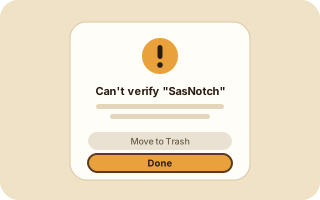
1Open SasNotch once. When the warning appears, click Done.
-
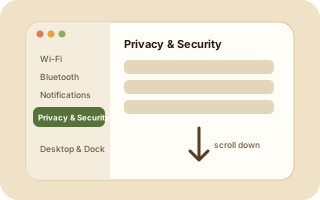
2Open System Settings, click Privacy & Security, then scroll down.
-
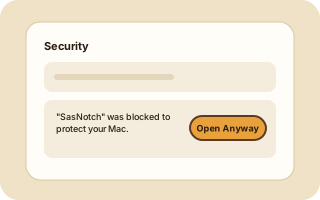
3Click Open Anyway next to SasNotch, then confirm. Your Mac may ask for your password.
Learn SasNotch in 1 minute
There are three places to know: the island, the menu bar and Settings.
In this video
Point at the notch and the island opens, with your calendar, music and timers in sections you can switch between. Right-click the sasquatch in the menu bar for quick controls. In Settings, search for any option, pick which features to use, and tune each tool on its own page, including the size and layout of the island itself.
Point at the notch
The island opens on its own. Move away and it tucks itself back in.
Right-click the menu bar sasquatch
Settings, Keep Awake, Pause Island, updates and Quit are all there.
Settings › Features
Turn tools on or off. Anything you switch off stops loading.
Questions
Is it free?
Yes. There's no trial, no ads and no account. SasNotch is free and open source.
How do I use it?
Point at the notch to open the island. Right-click the sasquatch in the menu bar for quick controls, and use Settings › Features to pick your tools. The 1-minute guide shows all three.
Is it safe?
The code is public on GitHub, so anyone can read exactly what SasNotch does. Every update is signed, and SasNotch checks that signature before it installs anything.
How do I update it?
You don't have to do anything. SasNotch checks for a new version once a day and asks before it installs one. You can also click its menu bar icon and choose Check for Updates.
How do I uninstall it?
Click the SasNotch icon in the menu bar and choose Quit. Then drag SasNotch from your Applications folder to the Trash.
Stuck installing? Watch the 45-second install video.
Give your notch something to do.
Free · macOS 14+ · Apple Silicon

